Virtual Modem by FabulaTech
Virtual Modem allows any modem communications applications to interact via LAN or the Internet. Application "dials" remote IP address instead of making a dial-direct call using hardware modem. Moreover, it looks as if the application worked with hardware modem. But in fact, a hardware modem is not used.
Usually hardware modems are used to connect communications applications over standard phone lines.

Common solution has some drawbacks:
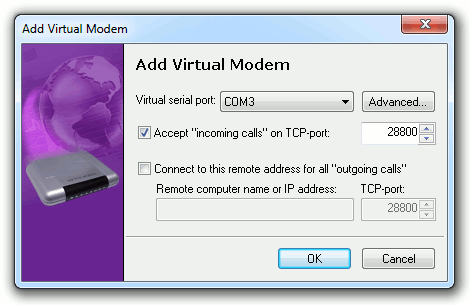
Virtual Modem allows you to create and use virtual modems instead of hardware modems. At that network connection (LAN or the Internet) is used for data exchange instead of phone lines.

1) Application A on local computer "makes a call" using virtual modem #1.
2) Virtual modem #1 on local computer connects to virtual modem #2 on remote computer over the network.
3) Virtual modem #2 accepts network connection and initiate "incoming call" for application B.
4) Application B reacts on "incoming call" from virtual modem #2 as if it was real incoming call initiated by hardware modem.
And now, applications exchange data as if they were connected via physical phone lines.
Virtual modems look like hardware modems for all communications applications.
Virtual Modem allows you to use network connection (LAN or the Internet) instead of hardware modems without making changes in existing communications software.
Virtual Modem is successfully used in such spheres as financial systems, credit card transaction, legal information database access, real estate information systems, device control and data acquisition, building automation, security systems.
| General |
|---|
| Virtual modems look and work like real hardware modems |
| Applications use virtual modems directly from virtual serial ports or through TAPI |
| Up to 256 virtual modems can be created |
| Virtual modems can "dial" to remote virtual modems using IP address (or computer name) and TCP-port instead of phone number |
| Virtual modems can accept "incoming calls" from other virtual modems |
| Phone book. It allows you to simplify switch to virtual modems from hardware modems. You can specify telephone number corresponding to IP address (or computer name) and TCP-port of remote virtual modems. |
| Once created virtual modems are operable at each system startup (even prior to user login) |
| Compatibility |
| Support of main AT commands |
| Support of main S-registers |
| User interface |
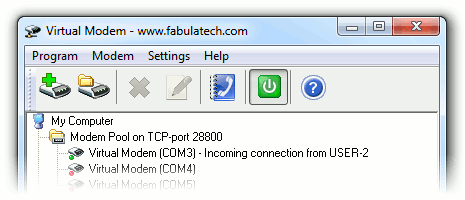
| User-friendly program interface |
| Hot virtual modem creation and removal, without computer reboot |
Virtual Modem is compatible with Windows Vista™.
USB for Remote Desktop 1.1 released. The program engine is significantly improved. Stability improvements are implemented for some specific USB devices. Devices with serial numbers are handled more correctly.
June 20, 2008Serial Port Mapper 1.3.3 released. Issue with disappearing swapped serial ports fixed.
June 11, 2008Serial Port Control 2.0.3 has been released. GetSerialPortDescription method has been added. OnReceive event has been optimized for speed.
May 22, 2008USB over Network 3.4 has been released. Stability improvements on some specific USB devices.
Virtual modems look like hardware modems for all communications applications.